This page needs JavaScript switched on to build your invoice.
The Modern invoice template
A full-width coloured banner across the top carries the title and the invoice details, with tidy alternating rows in the table. It looks fresh and confident.
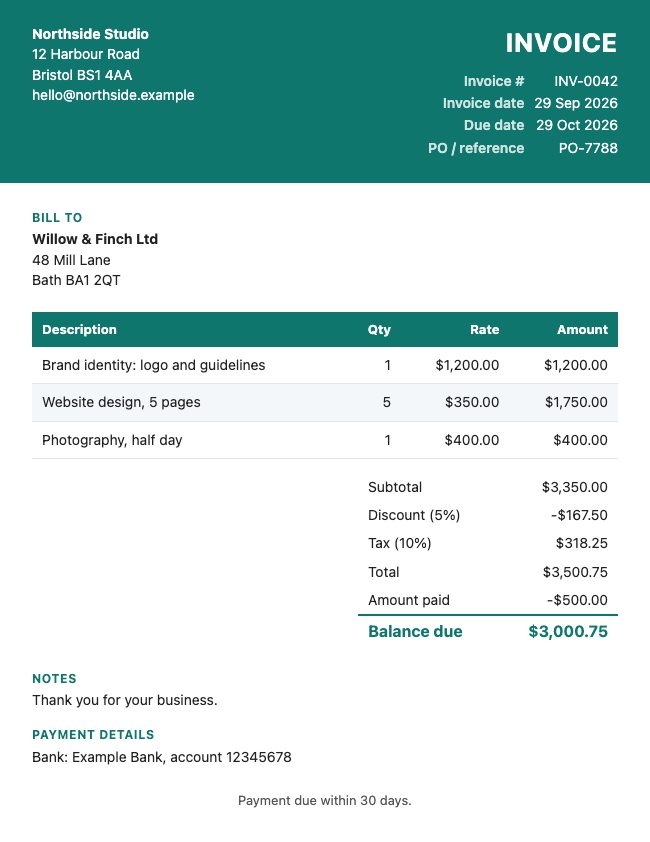
How it looks
The banner takes your chosen colour. Alternate rows in the table are lightly shaded to make long lists easy to read.
Suits: designers, agencies, creative and technology businesses.
How to use it
- Fill in your details and your client's details above. The invoice builds itself as you type.
- Add your lines, discount, tax and payment details.
- Change the colour, or add your logo, if you like.
- Save it as a PDF, Word or Excel file. Or try a different look from the Choose a look box.
Want more choice? See all the invoice templates, or go to the main invoice generator. Save your invoice as a PDF, Word or Excel file, or print it.
Questions people ask
What colours work well with the Modern template?
Deeper colours, such as navy, teal, green or burgundy, look best, since the title is white on the banner.
Will the banner show on a printed invoice?
Yes, but some printers save ink and skip backgrounds. In the print box, look for an option such as background graphics.
Is anything I type sent to a server?
No. The document is made inside your browser. Your business details and the last document are remembered on this device only, so you do not have to retype them, and you can wipe them with the link under the preview.
Related: Classic invoice · Minimal invoice · Formal invoice · Invoice generator